FormRank Lead Scoring Brings AI-Powered Lead Qualification to WordPress Form Plugins
In the competitive landscape of small business marketing, the ability to effectively qualify leads can significantly impact growth and revenue. With the advent of AI technology, tools like FormRank Lead Scoring are transforming how businesses interact with potential customers through their online forms. This article delves into the features, benefits, and operational mechanics of FormRank Lead Scoring, a free WordPress plugin designed to enhance lead qualification for small businesses.
Understanding the Need for Lead Qualification
Small businesses often face the challenge of managing numerous form submissions each month. While these submissions may represent potential customers, many are low quality and do not translate into sales. The manual sorting of these leads can be time-consuming and inefficient, leading to missed opportunities. This is where lead scoring comes into play, allowing businesses to prioritize their follow-ups based on the likelihood of conversion.
The Role of AI in Lead Scoring
Artificial Intelligence has revolutionized many aspects of business operations, including lead qualification. By analyzing various data points, AI can assess the quality of leads more accurately than traditional methods. FormRank Lead Scoring employs AI algorithms to evaluate form submissions, providing businesses with a clear picture of which leads are worth pursuing.
Features of FormRank Lead Scoring
FormRank Lead Scoring is designed to seamlessly integrate with popular WordPress form plugins, making it accessible to a wide range of users. Below are some of the key features of this innovative tool:
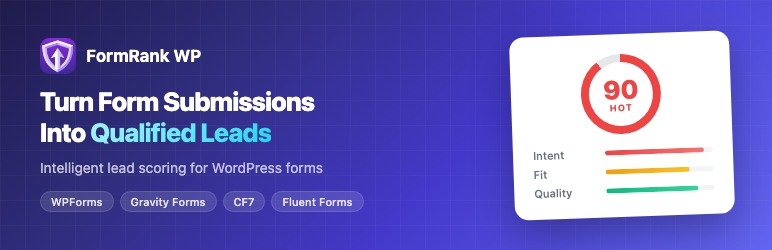
- Automatic Lead Scoring: Each form submission is automatically scored on a scale from 1 to 100, allowing businesses to quickly assess the potential of each lead.
- Integration with Popular Form Plugins: FormRank connects with widely used form plugins such as WPForms, Gravity Forms, Contact Form 7, Fluent Forms, and Formidable Forms.
- Lead Categorization: Leads are classified into five categories: Hot, Warm, Neutral, Cool, or Cold, based on their score, helping teams focus on the most promising opportunities.
- Historical Data Import: Businesses can import existing form submissions from supported plugins and receive immediate scoring, maximizing the value of past data.
- CSV Export: Scored leads can be easily exported to CSV format, facilitating integration with CRMs, spreadsheets, and other business tools.
- User-Friendly Interface: Everything operates within the WordPress admin dashboard, eliminating the need for complex setups or external dashboards.
How FormRank Works
Implementing FormRank Lead Scoring is straightforward. Once installed, users can configure the plugin by describing their ideal customer profile. The AI then begins to analyze incoming form submissions based on intent signals, business fit, submission quality, and engagement patterns.
Scoring Mechanism
The scoring engine evaluates various factors to determine the likelihood of a lead converting into a customer. These factors include:
- Intent Signals: Indicators of a lead’s interest, such as the content of their submission and the urgency of their inquiry.
- Business Fit: How well the lead aligns with the ideal customer profile established by the business.
- Submission Quality: The completeness and clarity of the information provided in the form.
- Engagement Patterns: Historical data on how the lead has interacted with the business, including previous submissions or website visits.
By analyzing these elements, FormRank assigns a score that reflects the lead’s potential value, allowing businesses to prioritize their follow-up efforts effectively.
Cost-Effectiveness of FormRank
One of the standout features of FormRank is its affordability. Unlike enterprise-level lead scoring tools such as MadKudu or Clearbit, which can cost thousands of dollars per month, FormRank offers a free tier that includes:
- Unlimited lead capture
- All form integrations
- 15 AI-powered rescores per month
For businesses that require more extensive capabilities, the Pro plan is available for just $149 per year, providing unlimited AI scoring at a fraction of the cost of competing solutions.
Benefits of Using FormRank Lead Scoring
The implementation of FormRank Lead Scoring offers numerous advantages for small businesses:
Enhanced Efficiency
By automating the lead scoring process, businesses can save countless hours that would otherwise be spent manually sorting through submissions. This efficiency allows teams to focus on high-value leads, improving their chances of conversion.
Improved Lead Quality
With the ability to categorize leads based on their scores, businesses can prioritize follow-ups with those who are most likely to convert. This targeted approach enhances the quality of leads pursued, ultimately leading to higher sales rates.
Data-Driven Decision Making
FormRank provides valuable insights into lead behavior and engagement patterns. This data can inform marketing strategies and help businesses refine their ideal customer profiles over time.
Getting Started with FormRank Lead Scoring
To begin using FormRank Lead Scoring, follow these simple steps:
- Install the Plugin: Download and install FormRank from the WordPress plugin directory or directly from the FormRank website.
- Configure Settings: Set up your ideal customer profile in the plugin settings to guide the AI scoring process.
- Connect Your Forms: Integrate FormRank with your existing form plugins to start scoring submissions immediately.
- Monitor and Adjust: Regularly review scored leads and adjust your customer profile settings as needed to optimize scoring accuracy.
Success Stories
Many small businesses have already begun to see the benefits of using FormRank Lead Scoring. Here are a few testimonials from satisfied users:
“FormRank has completely changed the way we handle leads. The automated scoring saves us hours every week, and we can now focus on the leads that matter most!” – Sarah J., Marketing Director
“The integration with our existing forms was seamless, and the insights we gain from the scoring are invaluable. We’ve seen a significant increase in our conversion rates since using FormRank.” – Mark T., Business Owner
Frequently Asked Questions
FormRank integrates with several popular WordPress form plugins, including WPForms, Gravity Forms, Contact Form 7, Fluent Forms, and Formidable Forms.
Yes, FormRank offers a free tier that includes unlimited lead capture and basic AI scoring features. For more advanced capabilities, a Pro plan is available at a low annual fee.
Leads are categorized into five groups: Hot, Warm, Neutral, Cool, or Cold, based on their score, which reflects their likelihood of conversion.
Call To Action
Call To Action
Ready to enhance your lead qualification process? Start using FormRank Lead Scoring today and transform how you manage your leads. Visit FormRank’s website to learn more and get started!
[np_contact_btn]
Note: FormRank Lead Scoring is a game-changer for small businesses looking to streamline their lead qualification process. With its AI-powered features and user-friendly interface, it provides significant value without the hefty price tag of traditional enterprise tools.