Google Unveils AI Plan To End Android Developer Toil
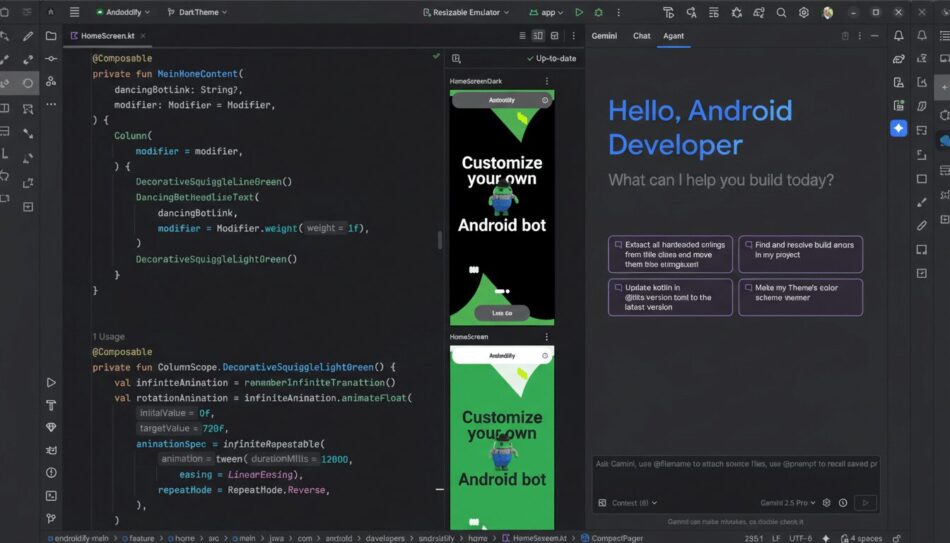
Google is rolling out a sweeping AI push across Android Studio and the Play developer ecosystem, betting that Gemini-powered agents can erase the drudgery that slows mobile teams and, in turn, unlock a faster cadence of innovation. The company’s pitch is pragmatic: let AI handle the repetitive, brittle work that derails flow, while keeping humans firmly in charge of decisions and direction.
How Gemini Is Being Woven Into Android Studio
Gemini is now threaded through the Android development workflow, from scaffolding features to debugging and maintenance. Context-aware code suggestions no longer operate on a single file; they draw on project structure, architecture patterns, and style guides to propose changes that compile and slot into existing conventions. Think less tab-completion and more repository-aware assistance.
Version Upgrade Agent
A standout feature is the Version Upgrade Agent. Dependency churn—new SDKs, breaking API tweaks, library deprecations—routinely burns sprints. The agent analyzes a project’s graph, identifies compatible upgrade paths, attempts changes in a branch, and surfaces a diff for review, complete with test hints. Paired with App Quality Insights, which unifies Firebase Crashlytics and Play Console signals, Gemini also triages crashes and performance regressions with targeted fix suggestions before issues reach users.
Prototyping Speed Boost
Prototyping is getting a speed boost as well. Google says Gemini can translate design artifacts into working UI code in minutes, tightening the “idea to feel” loop. One real-world example is the team behind Entri, an online learning app, which reported that flows that once took hours of UI work were assembled in roughly 45 minutes, helping cut average UI build time by 40%.
Model Choice and Enterprise-Grade Guardrails
In a notable shift, Google is not mandating a single model. Android Studio’s AI features can be powered by the developer’s preferred large language model, giving teams control over performance, privacy posture, and cost. That flexibility matters for regulated industries and multinational organizations balancing data residency with latency and accuracy.
For businesses, Gemini’s premium tier is delivered via Google Cloud with enterprise-grade controls—Private Google Access, VPC Service Controls, and granular identity and access management—so companies can adopt assistants without relaxing their security boundaries. Google emphasizes that proprietary code is not stored for training and that generation happens with transparent suggestions rather than background edits, ensuring changes pass through the same review gates as human-written code.
A Surgical Approach To Toil In Android Development
Inside Google’s plan is a sharp definition of “toil”: tasks that erode momentum and require precision, not creativity. Examples include wiring permissions and resources, migrating APIs, squashing lint violations, generating instrumentation tests, and wrangling Gradle configurations. By targeting these hotspots, Gemini reduces context switching and preserves the developer’s scarce cognitive bandwidth for product design and systems thinking.
Equally important is transparency. Suggestions appear as IDE hints, pull request comments, and diffs you can accept or reject—no silent commits. This keeps responsibility and authorship clear, an approach that seasoned engineers tend to favor after early experiences with black-box automation.
Why This Matters For Modern Android Teams
Mobile teams operate under unique constraints: device fragmentation, OS version lag, changing Play policies, and intense performance budgets. When routine updates and compatibility work pile up, velocity suffers. Google’s integration strategy acknowledges this reality by embedding AI where toil actually accumulates—dependency graphs, crash pipelines, UI scaffolding—rather than treating AI as a generic chatbot bolted onto the side.
The timing tracks broader industry adoption. GitHub’s research has shown developers complete coding tasks notably faster with AI assistance, and its 2023 productivity report found the vast majority of professional developers already experiment with AI coding tools. McKinsey has estimated that software engineering could see productivity gains up to 45% for certain tasks as generative AI matures. For Android, where release cycles are tight and QA matrices are wide, even modest reductions in rework can translate into weeks saved per quarter.
Challenges and Considerations
There are caveats. AI can miss edge cases, produce overconfident code, or suggest migrations that compile but misalign with architecture. Google’s stance—keep humans in the loop, ground suggestions in the repository, and wire assistants into CI and review—acknowledges those risks. The systems will earn trust not by dazzling demos but by quietly preventing crashes, shrinking upgrade diffs, and catching regressions before launch.
What To Watch Next In Android Development
Expect tighter coupling between Android Studio, Play Console insights, and Gemini agents that can open issues, propose patches, and run targeted tests automatically. Model routing—choosing the right LLM per task—could further improve accuracy and cost control. If Google extends policy-aware assistance to help teams stay aligned with Play guidelines and privacy requirements, that could reduce release friction even more.
The north star is simple: if AI carries the heavy packs, developers can spend more time on the creative work that differentiates apps. With Gemini embedded across the toolchain, Google is betting that Android teams will ship smarter, stabler software—faster.
Frequently Asked Questions
Google’s AI plan involves integrating Gemini-powered agents into Android Studio to handle repetitive tasks, thereby increasing productivity and allowing developers to focus on more creative aspects of app development.
Gemini enhances the Android development workflow by providing context-aware code suggestions, automating version upgrades, and speeding up prototyping, which collectively reduce the time spent on tedious tasks.
Gemini’s AI features are delivered via Google Cloud with enterprise-grade security controls, including Private Google Access and identity management, ensuring that proprietary code is not stored for training and that suggestions are transparent.
Call To Action
Explore how integrating AI into your Android development process can enhance productivity and innovation. Leverage Gemini to streamline your workflow and focus on what truly matters—creating exceptional applications.
[np_contact_btn]
Note: The integration of AI into Android development represents a significant shift in how developers can manage their workflows, ultimately leading to faster and more efficient app creation.