Designing a Professional Front-End for a Messenger Application
- Utilize Angular for building a scalable messenger interface that supports high-load scenarios.
- Implement virtualized lists to enhance performance in message rendering.
- Incorporate a unique design with themes and localization capabilities for diverse user bases.
- Focus on cross-browser compatibility to ensure a seamless user experience across platforms.
Creating a professional front-end for a messenger application requires a strategic approach to technology selection and implementation. The choice of frameworks and libraries can significantly impact the performance and user experience of the application.
In this article, we will explore the process of designing a front-end for a messenger application, focusing on Angular as the primary framework. We will discuss the technical requirements, development strategies, and key components necessary for building a robust and user-friendly interface.
Continue Reading
Introduction to Messenger Application Development
The demand for efficient and user-friendly messaging applications is ever-increasing. A well-designed front-end is crucial for ensuring that users can communicate seamlessly. This article outlines the steps involved in creating a professional front-end for a messenger application using Angular, a powerful framework for building single-page applications (SPAs).
Choosing the Right Technology Stack
When developing a messenger application, selecting the right technology stack is essential. Among the various options available, Angular and ReactJS are two of the most popular frameworks for building SPAs. While both frameworks have their advantages, this article will focus on Angular due to its superior handling of non-classical virtualized lists, which is crucial for our messaging application.
Angular provides a robust structure for building applications, making it an ideal choice for high-performance scenarios. Additionally, the ng-virtual-list package enhances the application’s ability to manage large datasets efficiently, ensuring that users experience smooth scrolling and quick message retrieval.
Technical Requirements for the Messenger Front-End
Before diving into development, it is essential to outline the technical requirements for our messenger application:
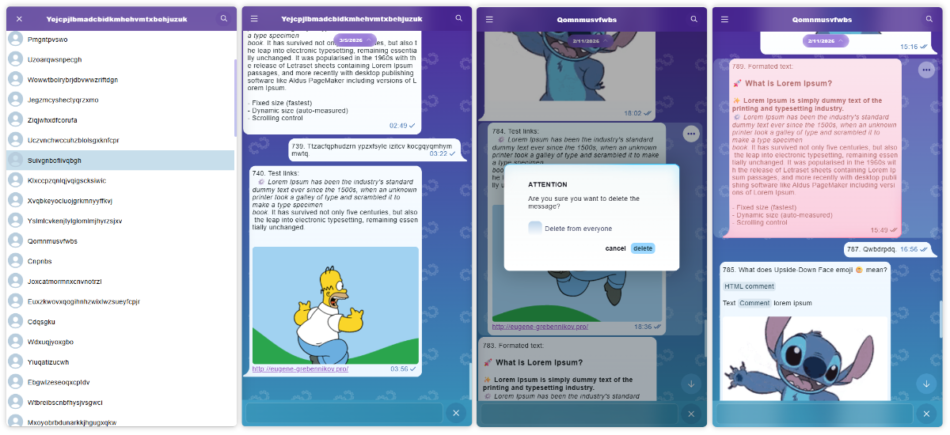
- A group viewing area that opens from the dock.
- A message viewing area sorted by creation date.
- Functionality for editing and deleting messages.
- A message compose block.
- Search functionality to find messages by substring.
- A unique design featuring customizable themes.
- Cross-browser and cross-platform compatibility.
Setting Up the Angular Project
To begin, we will create a new Angular project using version 20.x. The first step is to install the ng-virtual-list package, which will be integral to our message rendering process. This package allows us to implement virtualized lists, which are essential for handling high volumes of messages efficiently.
Here’s how to set up the project:
- Install Angular CLI if you haven’t already:
- Create a new Angular project:
- Navigate to the project directory:
- Install the ng-virtual-list package:
npm install -g @angular/cli
ng new messenger-app
cd messenger-app
npm install ng-virtual-list
Implementing Core Services
In our messenger application, we will implement several core services to manage group and message functionalities. These services will facilitate communication between components and handle data management.
Group Management Service
The groups-mock.service.ts will handle group-related operations, including:
- Retrieving groups with the
getGroupsmethod. - Creating new groups using the
createGroupmethod. - Updating existing groups with the
updateGroupmethod. - Deleting groups using the
deleteGroupmethod.
Message Management Service
The messages-mock.service.ts will manage message operations for specific chat IDs, including:
- Fetching messages with the
getMessagesmethod. - Creating new messages using the
createMessagemethod. - Updating messages with the
updateMessagemethod. - Patching messages using the
patchMessagesmethod. - Deleting messages with the
deleteMessagemethod.
Notification Service
The messages-notification-mock.service.ts will implement a mock WebSocket service to handle message notifications. This service will provide two Observables:
$typing: Signals when a user is typing a message.$messages: Signals when a new message is added.
Creating the User Interface Components
Our messenger application will consist of several key components, each responsible for a specific part of the user interface:
Main Chat Component
The chat.component.ts will serve as the main page for the messenger, displaying the active chat and message history.
Group Component
The groups.component.ts will manage the display of chat groups, allowing users to switch between different conversations.
Message View Area Component
The messages.component.ts will handle the rendering of messages, ensuring that they are displayed in a user-friendly manner.
Implementing Virtualized Lists
To optimize performance, we will utilize the ng-virtual-list library for rendering messages. This library allows us to display only a subset of messages at any given time, reducing the load on the browser and improving responsiveness.
We will define a template for rendering message items, which will include various message types such as:
- Typing indicators
- Unmailed separators
- Message groups
- Quotes
- Standard messages
Here’s an example of how to implement the item renderer:
<ng-template #itemRenderer let-index="index" let-data="data">
  <div class="message-template">
    @if (data?.data) {
      @switch (data.data.type) {
        @case ("typing-indicator") { <x-messages-typing-indicator ... /> }
        @case ("unmailed-separator") { <x-message-unmailed-separator ... /> }
        @case ("group") { <x-message-group ... /> }
        @case ("quote") { <x-message-box [messageType]="'quote'"... /> }
        @default { <x-message-box ... /> }
      }
    }
  </div>
</ng-template>
Message Interaction Features
The message-box.component.ts will implement features for viewing, selecting, editing, and deleting messages. This component will utilize SVG rendering to create visually appealing message displays with animations.
Additionally, we will implement a search feature that allows users to find messages by substring. This will be achieved using the ng-virtual-list library, with highlighting implemented through a custom directive.
Resource Management and Caching
To enhance performance further, we will implement a ResourceManager to manage image loading and caching policies. This will ensure that images are loaded efficiently, reducing the time taken to display messages.
Cross-Browser and Cross-Platform Compatibility
Our messenger application will be designed to work seamlessly across various browsers and platforms. This is crucial for reaching a broader audience and ensuring that users have a consistent experience regardless of their device.
We will test the application on multiple browsers, including Chrome, Firefox, Safari, and Edge, to ensure compatibility.
Live Demo and Conclusion
A live demo of the messenger application can be accessed at the following link: Live Demo. This demo showcases the features and functionalities discussed in this article.
In conclusion, designing a professional front-end for a messenger application involves careful planning and execution. By leveraging Angular and the ng-virtual-list library, we can create a high-performance, user-friendly interface that meets the needs of modern users.
Frequently Asked Questions
Angular provides a robust framework for building scalable applications, with features like dependency injection, two-way data binding, and a strong community support, making it ideal for high-performance messaging applications.
Virtualized list rendering only displays a subset of items at any time, reducing the number of DOM elements and improving rendering speed, which is crucial for applications handling large datasets like messaging.
Yes, the application can be adapted for right-to-left languages, such as Hebrew, by utilizing localization services and directives designed for this purpose.
Call To Action
Ready to build your own professional messenger application? Leverage the insights from this article to create a scalable and user-friendly interface that meets your business needs.
[np_contact_btn]
Note: Provide a strategic conclusion reinforcing long-term business impact and keyword relevance.