
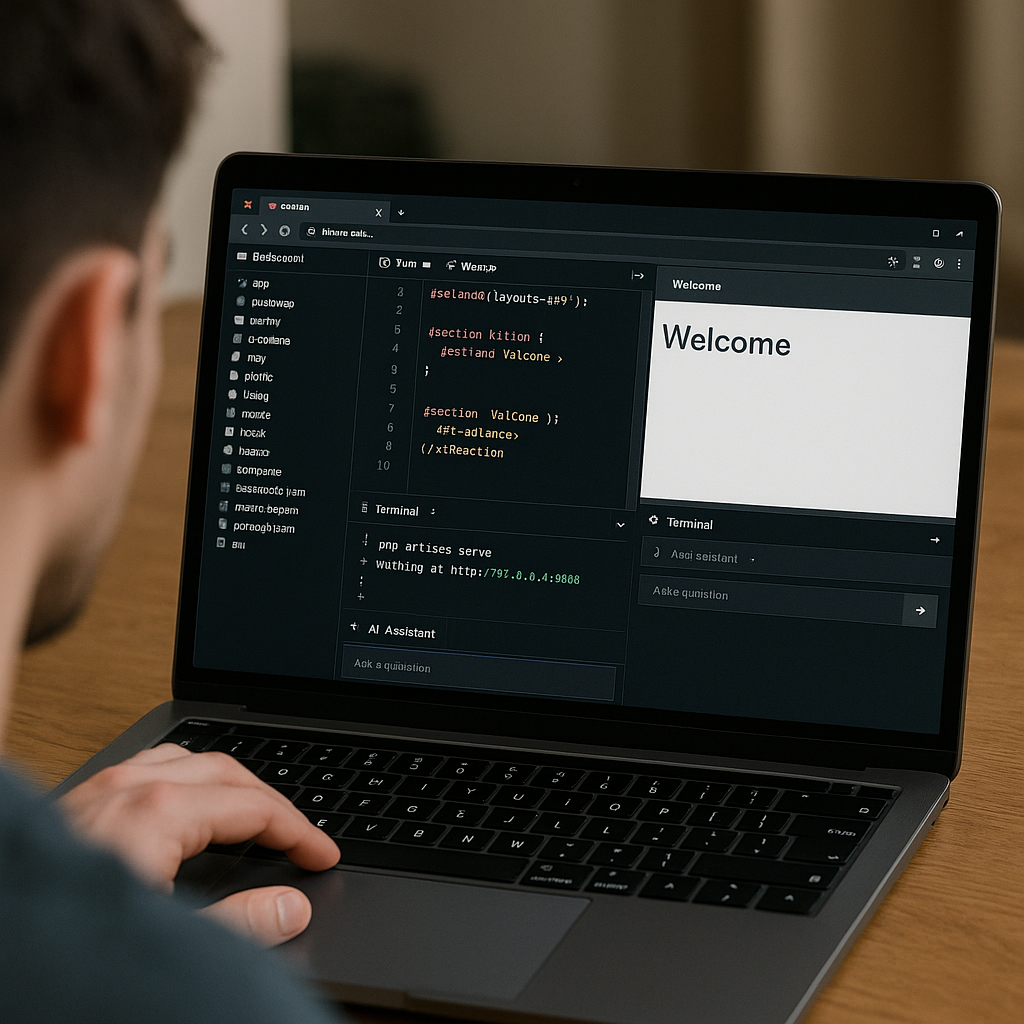
Liminal: A Browser-Based IDE for Laravel Powered by WebAssembly
- Develop Laravel applications directly in the browser without server setup or local PHP installation.
- Leverage WebAssembly to run PHP 8.4 seamlessly, enabling a full-featured development environment.
- Share live Laravel projects instantly via encoded URLs or sync with local folders using the File System Access API.
- Utilize an integrated AI assistant to enhance coding productivity and automate routine tasks.
Liminal is revolutionizing Laravel development by providing a browser-based IDE that eliminates the need for traditional server setups or local PHP environments. Powered by WebAssembly, it runs PHP 8.4 entirely in the browser, offering developers a comprehensive toolkit including a code editor, preview pane, terminal, and an AI-powered assistant. This innovative approach not only simplifies the development workflow but also enables instant sharing and collaboration through unique URLs encoding project state.
Designed for rapid prototyping, live demos, and seamless sharing of Laravel applications, Liminal integrates modern web technologies such as Vue 3, TypeScript, and Tailwind CSS. While it introduces some limitations inherent to running PHP in WebAssembly, its advantages in accessibility and ease of use make it a compelling option for Laravel developers seeking flexible and efficient development environments.
Continue Reading
What is Liminal and How Does It Work?
Liminal is a browser-based integrated development environment (IDE) specifically tailored for Laravel applications. Unlike traditional IDEs that require local PHP installations and server configurations, Liminal runs PHP 8.4 through WebAssembly directly in your browser. This means developers can write, run, and preview Laravel projects without any backend infrastructure or setup. The entire development environment is encapsulated within a single browser tab, making it highly portable and accessible from virtually any device.
Core Features of Liminal
- Code editor with syntax highlighting for PHP, Blade templates, JavaScript, TypeScript, JSON, and CSS, powered by CodeMirror 6.
- Preview pane that renders HTML output and supports navigation through Laravel routes with Tailwind CSS v4 automatically applied.
- Terminal interface enabling execution of Artisan commands with command history support.
- AI agent powered by OpenAI, capable of reading and writing files, running commands, and assisting with coding tasks.
Getting Started with Liminal
Liminal is not a Composer package or a plugin you add to an existing Laravel project. Instead, it requires cloning the repository and building the environment locally using modern JavaScript tooling. The setup process involves:
- Cloning the Liminal GitHub repository.
- Installing dependencies using Bun, a fast JavaScript runtime and package manager.
- Running Composer to install PHP dependencies optimized for production.
- Building the project and starting a local development server that opens the IDE in your browser.
This approach ensures you have a fully functional Laravel IDE running locally but accessible through your browser interface. The build process packages the Laravel application into a ZIP archive for efficient loading and type checking.
How Liminal Enhances Collaboration and Sharing
One of Liminal’s standout features is its ability to share live Laravel projects instantly through shareable URLs. Instead of requiring collaborators to clone repositories or install dependencies, Liminal encodes file changes directly into the URL. This enables anyone with the link to open the exact project state in their browser immediately, facilitating quick feedback, demos, or educational use cases.
Additionally, Liminal supports folder synchronization on your local machine using the File System Access API. This mirrors the virtual filesystem in the browser to a directory on your computer, allowing seamless integration with your existing workflows. Importing projects directly from GitHub repositories and exporting work as ZIP files further expands flexibility for developers.
Technical Architecture and Underlying Technologies
Liminal leverages a modern tech stack to deliver its innovative browser-based Laravel IDE:
- Vue 3 and TypeScript form the frontend framework and language, ensuring a reactive and type-safe user interface.
- Vite is used as the build tool, providing fast bundling and hot module replacement.
- Tailwind CSS v4 styles the interface with utility-first CSS classes for a clean and responsive design.
- CodeMirror 6 powers the code editor with advanced syntax highlighting and editing features.
- PHP 8.4 runs inside the browser through the
@php-wasm/web-8.4package, compiled to WebAssembly.
This combination enables Liminal to deliver a rich development experience entirely client-side, showcasing the potential of WebAssembly in the PHP and Laravel ecosystem.
Limitations and Considerations When Using Liminal
While Liminal offers groundbreaking convenience, there are important trade-offs to consider due to the nature of running PHP in WebAssembly:
- No external network access from PHP code, which restricts API calls or external service integration during development.
- The vendor directory is pre-bundled and cannot be modified dynamically, limiting package installation or updates within the IDE.
- Only SQLite is supported as the database engine, excluding MySQL, PostgreSQL, or other database systems.
- Performance is slower compared to native PHP execution, which may affect complex or resource-intensive applications.
Despite these constraints, Liminal excels as a tool for quick prototyping, educational purposes, and sharing reproducible Laravel examples without the overhead of full environment setup.
Practical Use Cases for Liminal
Liminal is particularly well-suited for several scenarios:
- Rapid prototyping of Laravel features or UI components without setting up a local environment.
- Live demonstrations during presentations or workshops, allowing instant code edits and previews.
- Collaborative learning where students or team members can share and explore Laravel projects through URLs.
- Experimenting with Laravel APIs and Blade templates in a sandboxed environment.
Future Potential and Impact on Laravel Development
Liminal represents a significant step toward more accessible and flexible Laravel development workflows. By harnessing WebAssembly, it challenges traditional notions of PHP development tied to local or server environments. As WebAssembly technology matures and browser capabilities expand, tools like Liminal could evolve to support more complex applications, external integrations, and improved performance.
Moreover, the integration of AI assistants within the IDE hints at a future where developers receive real-time code suggestions, automated refactoring, and intelligent debugging support directly in the browser. This could dramatically increase productivity and lower the barrier to entry for new Laravel developers.
How to Access and Try Liminal Today
You can explore Liminal directly by visiting liminal.aschmelyun.com. The source code is open and available on GitHub for those interested in building or customizing the environment locally. This openness encourages community contributions and experimentation with this promising technology.
Summary of Key Benefits
- No server setup or local PHP installation required, reducing onboarding friction.
- Full Laravel environment including code editing, preview, terminal, and AI assistance in one browser tab.
- Instant sharing through encoded URLs enables seamless collaboration and demos.
- Modern web stack ensures a smooth and responsive user experience.
Frequently Asked Questions
composer create-project laravel/laravel. Configure environment variables and start the development server with php artisan serve.Call To Action
Experience the future of Laravel development today by trying Liminal, the browser-based IDE powered by WebAssembly, and streamline your workflow with instant access, sharing, and AI-powered assistance.
[np_contact_btn]
Note: Provide a strategic conclusion reinforcing long-term business impact and keyword relevance.
