WordPress Debuts my.wordpress.net Private Workspace
- Launch of a browser-based private workspace enabling full WordPress sites without hosting or domain setup.
- Integration of local-first data storage ensuring privacy and offline accessibility.
- Built-in apps and an AI-ready toolkit enhance prototyping and content management.
- Clear migration paths from browser-based sites to traditional WordPress hosting for public publishing.
WordPress has introduced my.wordpress.net, a groundbreaking browser-first private workspace that allows users to create and manage a full WordPress site entirely within their browser. This innovative platform removes traditional barriers such as hosting, domain registration, and account creation, making it accessible for personal projects, prototyping, and private content management.
Designed with the principles of the local-first software movement, my.wordpress.net stores all data locally on the user’s device, ensuring privacy and resilience. This new approach not only benefits creators and developers by providing a sandbox environment but also aligns with the growing demand for secure, private digital workspaces.
Continue Reading
What Is my.wordpress.net and How Does It Work?
my.wordpress.net is a private workspace hosted entirely within your web browser, enabling you to spin up a complete WordPress site without the need for traditional infrastructure like hosting services or domain registration. Unlike conventional WordPress installs that require server setups, this platform leverages the power of WebAssembly to run PHP and SQLite directly in the browser, creating a seamless, local-first environment.
All your content, themes, and plug-ins are stored in the browser’s storage systems such as IndexedDB, which means your data never leaves your device unless you explicitly export or migrate it. This architecture prioritizes privacy and security, making it ideal for personal use cases such as drafting, research, and development without exposing your work to the public internet.
Under the Hood: The Technology Behind WordPress Playground
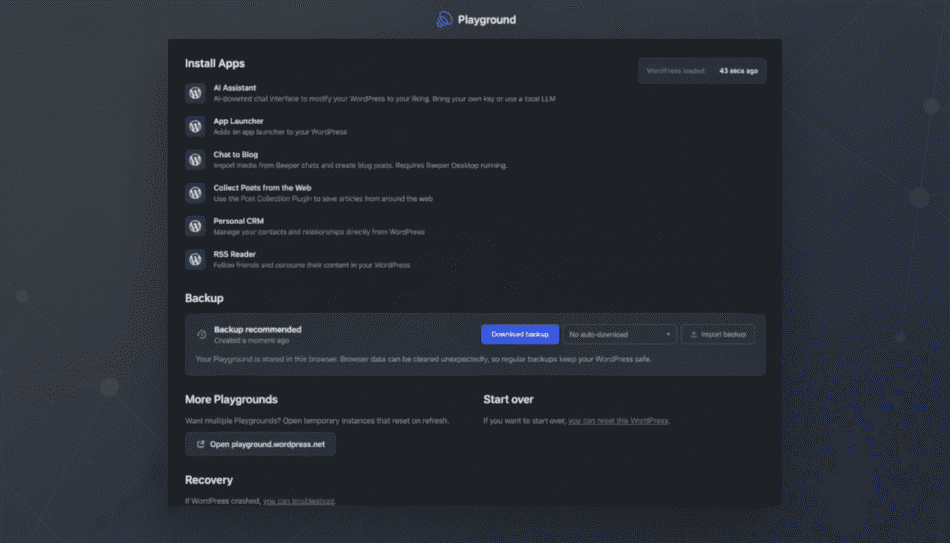
The engine powering my.wordpress.net is WordPress Playground, an open-source project that compiles PHP and SQLite into WebAssembly. This allows WordPress to run natively inside modern browsers, independent of external servers. The first launch of the workspace may take longer as it loads all necessary components, but subsequent uses are faster and more responsive.
The browser storage starts at roughly 100MB, which suits text-heavy sites or lightweight applications. While this limits media-heavy projects, it ensures fast performance and a smooth user experience. Users can also create temporary instances that disappear upon refresh, perfect for quick tests or experiments.
Built-In Apps and AI Integration for Enhanced Productivity
my.wordpress.net is not just a blank canvas; it comes equipped with an App Catalog featuring plug-in-powered tools such as a Personal CRM, RSS Reader, bookmarking utilities, and an AI Workspace. These applications provide users with ready-made frameworks to customize and extend their private sites.
The AI Workspace supports an assistant capable of modifying your environment, creating or adjusting plug-ins, and answering questions about your stored data. Integrations with AI models like OpenAI enable users to accelerate customization and transform their workspace into a dynamic, searchable knowledge base.
Why This Matters: Benefits for Creators, Developers, and New Users
WordPress powers over 40% of websites globally, but the initial setup process can be intimidating for newcomers. my.wordpress.net eliminates these hurdles by offering a zero-configuration, browser-based workspace that anyone can access instantly. This lowers the barrier to entry for new creators and hobbyists who want to experiment without technical overhead.
For developers, the platform serves as a rapid prototyping lab where themes, custom post types, and plug-ins can be tested without managing local servers or containers. It supports the growing trend of AI-assisted development tools in the WordPress ecosystem, enhancing productivity and creativity.
Known Limitations and Migration Strategies
While my.wordpress.net offers a unique private workspace, it comes with trade-offs. Since all data is stored locally, switching devices does not carry your site with you, and clearing browser data can result in content loss. Therefore, regular backups and exports are essential.
The platform is best suited for personal notes, prototypes, and lightweight applications rather than media-intensive or multiuser projects. When ready to publish, users can easily export their content and migrate to a traditional WordPress host, bringing along tested themes and plug-ins to minimize transition friction.
Positioning Among Private Workspace Platforms
my.wordpress.net occupies a unique niche at the intersection of private knowledge management and full-featured website development. Unlike tools like Notion or Obsidian, which focus on note-taking, or developer platforms like CodeSandbox that emphasize coding, this workspace offers the complete WordPress stack in a private, local-first environment.
This combination appeals to creators who prioritize privacy and control, and developers who require instant iteration without server dependencies. By shrinking the gap between concept and execution, WordPress is poised to unlock new creative projects and workflows.
Practical Tips for Using my.wordpress.net Effectively
- Start with lightweight projects such as personal journals, research hubs, or prototype themes to maximize performance and storage efficiency.
- Regularly export your site data to avoid accidental loss due to browser cache clearing or device changes.
- Leverage the AI assistant to customize plug-ins or scaffold new features quickly, enhancing productivity.
- Use temporary instances for quick testing of new ideas without cluttering your main workspace.
- Plan migration early if you intend to publish publicly, ensuring smooth transition to traditional WordPress hosting.
Future Outlook and Impact on the WordPress Ecosystem
The launch of my.wordpress.net signals WordPress’s commitment to innovation and accessibility. By embracing browser-based, local-first technology, WordPress is expanding its reach to new audiences and use cases. This approach aligns with broader industry trends emphasizing privacy, offline capabilities, and AI integration.
As the platform evolves, it may inspire new workflows and hybrid models combining private experimentation with public publishing. For businesses and individual creators alike, this development offers a powerful tool to accelerate digital content creation and management.
Frequently Asked Questions
Call To Action
Explore the new my.wordpress.net private workspace today to experience seamless, secure, and zero-setup WordPress site creation directly in your browser—perfect for prototyping, personal projects, and AI-powered customization.
Note: Provide a strategic conclusion reinforcing long-term business impact and keyword relevance.