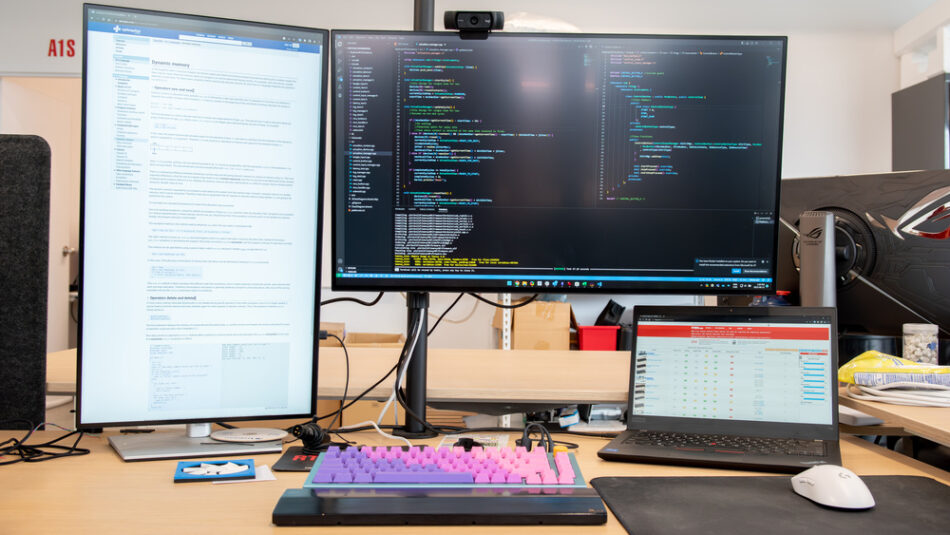
The 6 Best Monitors For Programming of 2026
- Discover top monitors optimized for programming productivity and comfort in 2026.
- Understand key features like screen resolution, color accuracy, and ergonomics that impact coding efficiency.
- Compare the best options for different budgets and programming needs including ultrawide and curved displays.
- Gain insights on scalability and long-term value for developers seeking reliable workstation monitors.
Choosing the right monitor is crucial for programmers who spend hours coding, debugging, and managing multiple windows. The best monitors for programming in 2026 combine high resolution, comfortable ergonomics, and excellent color fidelity to reduce eye strain and boost productivity.
This guide highlights the top six monitors that excel in these areas, helping developers make an informed choice tailored to their workflow and budget. From ultrawide screens that enhance multitasking to 4K displays offering crystal-clear text rendering, these selections represent the forefront of programmer-friendly display technology.
Continue Reading
What Makes a Monitor Ideal for Programming?
The best monitors for programming prioritize clarity, comfort, and workspace efficiency. High pixel density ensures sharp text rendering, which reduces eye fatigue during long coding sessions. Monitors with adjustable stands and flicker-free technology help maintain ergonomic posture and minimize strain.
Additionally, features such as wide color gamut and accurate color reproduction benefit developers working with UI/UX design or front-end development. Connectivity options like USB-C and multiple display ports support seamless integration with modern workstations and laptops.
Top 6 Monitors for Programming in 2026
1. ASUS ROG Swift OLED PG27UCDM
The ASUS ROG Swift OLED PG27UCDM offers a stunning 27-inch 4K OLED panel with exceptional contrast and vibrant colors. Its ultra-fast response time and high refresh rate make it a versatile choice for programmers who also game or create multimedia content. The OLED technology provides deep blacks and reduces eye strain, ideal for extended coding hours.
- 4K resolution for crisp text and detailed visuals
- Ergonomic stand with tilt, swivel, and height adjustment
- Multiple connectivity options including DisplayPort and USB-C
- High dynamic range (HDR) support for accurate color rendering
2. Dell U2725QE
Known for its professional-grade color accuracy, the Dell U2725QE is a 27-inch 4K IPS monitor that excels in delivering sharp, flicker-free images. Its factory calibration ensures precise colors, making it perfect for developers involved in design and front-end coding. The monitor’s comfort features include a fully adjustable stand and low blue light mode.
- 27-inch 4K IPS panel with wide color gamut
- ComfortView Plus technology to reduce harmful blue light
- USB-C connectivity with power delivery for streamlined setups
- Excellent build quality and cable management
3. LG 27GX700A-B
The LG 27GX700A-B is a 27-inch QHD (2560×1440) IPS monitor designed for high refresh rates and smooth performance. While primarily a gaming monitor, its sharp resolution and ergonomic design make it suitable for programmers who value fluid multitasking and quick window switching. The monitor’s flicker-free technology and adjustable stand enhance user comfort.
- QHD resolution balancing sharpness and performance
- 144Hz refresh rate for smooth transitions and animations
- Ergonomic adjustments including height, tilt, and pivot
- AMD FreeSync support for tear-free visuals
4. Dell Alienware AW3425DW
For programmers who prefer ultrawide displays, the Dell Alienware AW3425DW offers a 34-inch curved QHD panel with excellent color accuracy and immersive screen real estate. This monitor is ideal for multitasking, allowing developers to view multiple code windows side-by-side without the need for multiple monitors.
- 34-inch ultrawide curved display for enhanced workspace
- 3440×1440 resolution with Nano IPS technology
- Adjustable stand for ergonomic comfort
- High refresh rate and G-Sync compatibility
5. Acer Nitro XV275K
The Acer Nitro XV275K is a 27-inch 4K IPS monitor that balances affordability with professional features. It delivers sharp text clarity and wide viewing angles, making it a solid choice for programmers on a budget who want a high-resolution display. Its low input lag and flicker-free screen also contribute to a comfortable coding environment.
- 4K resolution for detailed text and graphics
- IPS panel with wide viewing angles
- Ergonomic stand with tilt and height adjustment
- Affordable price point for programmers
6. MSI MPG 271QRX QD-OLED
The MSI MPG 271QRX QD-OLED combines OLED technology with quantum dot enhancements to deliver exceptional color accuracy and contrast on a 27-inch QHD screen. This monitor is ideal for developers who require precise color fidelity for UI development and multimedia projects. Its ergonomic features support long coding sessions comfortably.
- QD-OLED panel with vibrant colors and deep blacks
- 2560×1440 resolution for sharp text rendering
- Adjustable stand with multiple ergonomic options
- High contrast ratio reduces eye strain
How to Choose the Right Monitor for Your Programming Needs?
Start by assessing your primary tasks: Are you mainly coding, designing, or multitasking? For pure coding, prioritize resolution and text clarity. For UI/UX design, color accuracy becomes critical. Ultrawide monitors benefit multitaskers by providing expansive screen real estate.
Consider ergonomics to maintain comfort during long hours. Adjustable stands, flicker-free technology, and blue light filters reduce physical strain. Connectivity options like USB-C and DisplayPort ensure compatibility with your devices and future-proof your setup.
Budget is also a key factor. While 4K OLEDs offer premium features, QHD IPS monitors provide excellent value. Balance your investment against your workflow demands and scalability for future upgrades.
Benefits of High-Quality Monitors for Programming
- Improved productivity through sharper text and better multitasking capabilities
- Reduced eye strain with flicker-free screens and blue light reduction
- Enhanced color accuracy for developers working on visual projects
- Ergonomic designs that support healthier posture and comfort
- Future-proofing with modern connectivity and scalability options
Programming Monitor Buying Tips
- Choose a minimum resolution of 2560×1440 for clear text rendering.
- Opt for IPS or OLED panels for better color and viewing angles.
- Check for ergonomic adjustments: height, tilt, swivel, and pivot.
- Look for flicker-free technology and blue light filters to protect your eyes.
- Consider ultrawide or dual monitors for enhanced multitasking.
- Ensure compatibility with your devices via USB-C, HDMI, or DisplayPort.
- Read reviews focusing on programming and productivity use cases.
Frequently Asked Questions
Call To Action
Upgrade your programming setup today by choosing one of the best monitors optimized for productivity, comfort, and visual clarity in 2026. Invest in a display that supports your coding excellence and long-term health.
Note: Provide a strategic conclusion reinforcing long-term business impact and keyword relevance.