Multilingual AI Translator: A Free WordPress Plugin Leveraging Chrome’s AI for Automatic Post Translation
- Reduce translation costs significantly by using Chrome’s built-in AI translation function.
- Translate multiple posts in bulk efficiently across various languages without API delays.
- Enhance SEO with language-specific URLs and metadata for better local search indexing.
- Support for translating multimedia content and compatibility with popular WordPress page builders and e-commerce plugins.
The Multilingual AI Translator is a groundbreaking free WordPress plugin designed to automatically translate posts by harnessing Google Chrome’s built-in AI translation capabilities. Unlike many traditional translation plugins that rely on costly external APIs or services, this plugin leverages local AI models integrated within Chrome, offering users a cost-effective and high-speed solution for multilingual content management.
With features such as bulk translation, compatibility with popular content builders like Elementor and Gutenberg, and SEO optimization tailored to different languages, the plugin addresses the growing demand for accessible and efficient WordPress multilingual solutions. This article explores the plugin’s functionality, implementation strategies, benefits, and how it stands out in the competitive landscape of translation tools for WordPress websites.
Continue Reading
What is the Multilingual AI Translator Plugin?
The Multilingual AI Translator is a free WordPress plugin that automatically translates website posts and pages using the AI translation function built into Google Chrome. It eliminates the need for expensive third-party translation services by performing translations locally within the browser environment. This approach not only reduces costs but also enhances translation speed and reliability by avoiding external API call delays and usage restrictions.
How Does It Work?
The plugin taps into Chrome’s native AI translation APIs, which are embedded in the browser itself. When a user initiates a translation, the plugin uses these local AI models to convert content from the source language to the target language directly on the client side. This method ensures rapid processing and minimal latency, making it ideal for websites with high volumes of content requiring frequent updates or multilingual support.
Key Features and Benefits
- Cost-effective translation: Since it uses Chrome’s built-in AI, users avoid subscription fees or pay-per-use charges associated with traditional translation APIs.
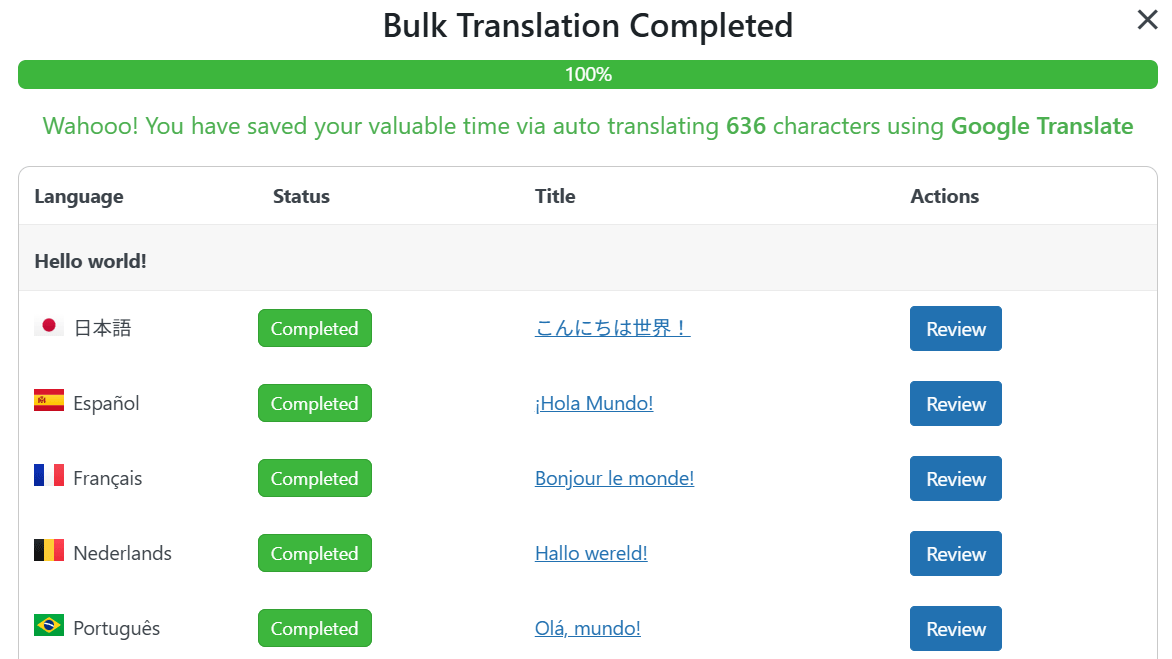
- Bulk translation capability: Translate multiple posts or pages simultaneously, saving time and effort when managing large websites.
- Compatibility with popular WordPress tools: Supports Elementor, Gutenberg, WooCommerce, and custom post types, ensuring seamless integration with diverse site architectures.
- Multimedia content translation: Titles, captions, alt text, and descriptions of media files can be translated, enhancing accessibility and user experience across languages.
- User dictionary for improved accuracy: Pin specific translations to a user dictionary to maintain consistency and improve translation quality over time.
- SEO optimization: Generates language-specific URLs and metadata to ensure translated content is properly indexed by local search engines, boosting international visibility.
Setting Up the Multilingual AI Translator Plugin
Getting started with the plugin is straightforward. After installation from the WordPress plugin repository, users can access a preview environment to test translation features before deploying them live. The setup involves enabling Chrome’s local AI translation toggle and selecting the desired languages for translation.
Step-by-Step Setup Process
- Install and activate the Multilingual AI Translator plugin from WordPress.org.
- Navigate to the plugin’s settings panel and disable any external machine translation options, such as Google Machine Translation, to prioritize Chrome’s local AI.
- Enable the Chrome Local AI Translation toggle to activate the browser-based translation engine.
- Add your target languages by selecting them from the language management interface and clicking “Add new language.”
- Use the bulk translation feature to select multiple posts or pages and translate them into the chosen languages with a single click.
Practical Use Cases and Implementation Insights
This plugin is ideal for businesses and content creators aiming to expand their reach into international markets without incurring high translation costs. By supporting bulk translation, it enables rapid multilingual content rollout, which is critical for marketing campaigns, e-commerce product listings, and multilingual blogs.
Moreover, the ability to translate multimedia content and metadata ensures that all aspects of the website are accessible and optimized for different language audiences, improving user engagement and search engine rankings.
Scalability and Performance Considerations
- Scalability: The bulk translation feature supports scaling content translation as your site grows, maintaining efficiency across hundreds or thousands of posts.
- Performance: By leveraging local AI, the plugin minimizes server load and reduces dependency on external services, resulting in faster translation turnaround.
- Risk management: Since translations occur locally, there is less risk of data privacy issues or API outages interrupting your multilingual content delivery.
SEO Benefits of Using Multilingual AI Translator
Properly translated content alone is not enough to rank well in international search engines. The plugin addresses this by automatically generating language-specific URLs and metadata, which are essential for localized SEO strategies. This ensures that search engines can correctly index and serve the translated pages to users in their native languages, improving organic traffic and conversion rates.
Comparing Multilingual AI Translator with Other Translation Plugins
Many popular WordPress translation plugins rely on external paid APIs like Google Cloud Translation or Microsoft Translator, which can become expensive as content volume increases. In contrast, the Multilingual AI Translator offers a free alternative by utilizing Chrome’s built-in AI, eliminating ongoing costs.
Additionally, its support for bulk translation and multimedia content sets it apart from some competitors that focus solely on text translation. However, since it depends on Chrome’s AI, users must ensure their browsers support the required AI features for optimal performance.
Potential Limitations and Considerations
While the plugin offers impressive functionality, there are some considerations:
- Dependence on Chrome’s AI means translation quality may vary based on the browser’s AI model updates and language support.
- Local AI translation requires users to have Chrome installed and updated, which may limit use in non-Chrome environments.
- Complex or highly specialized content might still require manual review or professional translation to ensure accuracy.
How to Maximize the Value of Multilingual AI Translator
To get the best results from the plugin, consider the following strategies:
- Regularly update user dictionaries to maintain consistent translations of industry-specific terms and brand names.
- Combine automated translation with manual proofreading for critical content to ensure quality and cultural appropriateness.
- Leverage SEO features by customizing metadata and URLs for each language to boost search engine rankings.
- Use bulk translation during content planning to efficiently prepare multilingual campaigns and product launches.
Future Outlook and Plugin Development
As AI translation technology continues to advance, plugins like the Multilingual AI Translator are poised to become central tools for WordPress site owners seeking affordable and scalable multilingual solutions. Ongoing improvements in Chrome’s AI models and potential expansions to support other browsers or AI engines could further enhance the plugin’s capabilities and user base.
Frequently Asked Questions
Call To Action
Experience seamless and cost-effective multilingual content management by integrating the Multilingual AI Translator plugin into your WordPress site today. Boost your global reach with AI-powered translations and optimized SEO features.
Note: Provide a strategic conclusion reinforcing long-term business impact and keyword relevance.