Is The WordPress iOS App Any Good?
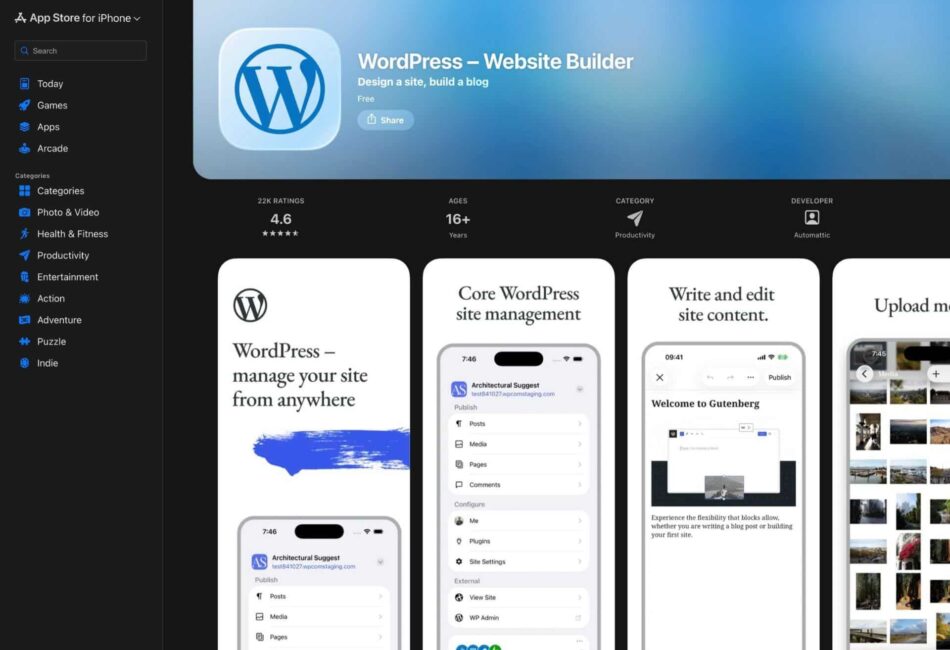
If you manage a WordPress site, you’ve probably wondered whether the WordPress mobile app is worth downloading. Maybe you’re stuck in a waiting room and want to publish that draft post, or you noticed a typo on your homepage while scrolling through your phone at dinner. The question is: should you rely on the WordPress iOS app for managing your site, or is it more frustrating than it’s worth? Let’s take a look at what this app actually delivers.
What the WordPress Mobile App Does Well
The WordPress iOS app isn’t useless – it’s good at specific tasks that make mobile management genuinely convenient. Here are some of its key strengths:
Quick Content Updates
Need to fix a typo or update a sentence? The app handles basic text edits smoothly. You can jump into any published post, make your changes, and hit update without fighting the interface. For emergency fixes when you’re away from your desk, this functionality alone justifies having the app installed.
Publishing On the Go
The app’s editor works surprisingly well for drafting and publishing straightforward blog posts. If you’re writing text-focused content without complex layouts, you can absolutely write, format, and publish directly from your phone. The block editor converts reasonably well to mobile, and you can add images, headings, and basic formatting without major headaches.
Comment Moderation
Managing comments is actually one of the app’s strongest features. You get push notifications for new comments, can approve or trash them instantly, and respond quickly. If community engagement matters to your site, the WordPress mobile app makes staying on top of conversations significantly easier.
Stats Monitoring
Checking your site traffic and seeing which posts are performing well works perfectly on mobile. The stats interface is clean, loads quickly, and gives you the key metrics you need without overwhelming you with data.
The Limitations of the WordPress Mobile App
Here’s where things get complicated. The WordPress iOS app has some serious constraints that make it frustrating for anything beyond basic tasks. Here are the main limitations:
Limited Plugin Support
This is the biggest drawback. Most WordPress plugins simply don’t work through the mobile app. If your site relies on advanced SEO plugins, page builders, form builders, or custom functionality, you’ll find yourself constantly hitting walls. The app can’t access most plugin settings, which means you’re managing a stripped-down version of your actual site.
Page Builder Compatibility Issues
If you built your site with Elementor, Divi, Beaver Builder, or any other visual page builder, the mobile app is essentially useless for editing those pages. You might be able to view them, but editing complex layouts through the app ranges from difficult to impossible. The app just wasn’t designed for the visual, drag-and-drop experience that these tools provide.
Theme Customization is Basically Non-Existent
Want to adjust your site’s appearance or customize theme settings? You’re out of luck. The WordPress mobile app offers virtually no theme customization options. You can’t modify your header, adjust colors, change layouts, or access most theme-specific features.
Media Library Struggles
While you can upload images through the app, managing your entire media library is clunky. Organizing images, editing file details, creating galleries, and handling multiple uploads feels awkward compared to the desktop experience. If you work with lots of visual content, you’ll find this limitation annoying.
No Access to Many Core Settings
Critical WordPress settings – permalinks, user roles, general site configurations – are either hidden or completely inaccessible through the mobile app. This means you can’t handle many administrative tasks that occasionally need attention.
So, Is the WordPress Mobile App Good?
The answer depends entirely on how you plan to use it. The WordPress iOS app is genuinely useful if you:
- Primarily need to publish and edit text-based blog posts.
- Want to moderate comments and engage with your audience quickly.
- Need to make emergency content fixes when you’re away from your computer.
- Run a straightforward blog without heavy plugin dependence.
- Like monitoring your site stats on the go.
On the other hand, you’ll find the WordPress mobile app frustrating if you:
- Rely heavily on page builders for your site design.
- Need to adjust plugin settings or site configurations regularly.
- Manage complex eCommerce functionality.
- Require access to advanced customization options.
- Handle sites with intricate custom functionality.
Should You Use the WordPress iOS App?
Download it, but set realistic expectations. Think of the WordPress mobile app as a convenient tool for specific situations, not a replacement for managing your site from a proper computer. The app works best as a supplementary tool. It’s perfect for those moments when you spot something that needs immediate attention and you’re nowhere near your laptop. It keeps you connected to your site’s activity through notifications and lets you handle time-sensitive tasks without panicking.
However, don’t plan on running your entire WordPress operation from your phone. The limitations are real, and trying to force the app to do things it wasn’t designed for will leave you frustrated.
The Verdict on WordPress Mobile App Pros and Cons
The WordPress iOS app is in a middle ground. It’s not a revolutionary tool that transforms how you manage WordPress, but it’s also not a buggy mess that deserves to be deleted. For bloggers and content creators publishing relatively simple posts, it’s a legitimately helpful addition to your workflow. For WordPress designers/developers or anyone managing complex WordPress sites with extensive customization, it’s a limited emergency tool at best.
The key is understanding what the WordPress mobile app can and can’t do before you rely on it. Use it for quick edits, comment management, and content publishing. Don’t expect it to replace your desktop WordPress dashboard or provide access to your site’s full functionality.
If you haven’t tried it yet, download the app and experiment with it. You’ll quickly figure out whether it fits your workflow or just takes up space on your phone. Just don’t expect miracles – it’s a mobile app for a complex content management system, and that reality comes with inevitable compromises.
Frequently Asked Questions
The main strengths of the WordPress iOS app include quick content updates, on-the-go publishing, effective comment moderation, and easy stats monitoring.
Limitations include limited plugin support, compatibility issues with page builders, lack of theme customization options, struggles with media library management, and no access to many core settings.
No, the WordPress iOS app is not suitable for managing complex WordPress sites, especially those that rely heavily on page builders, advanced plugins, or require extensive customization.
Call To Action
If you’re considering managing your WordPress site on the go, download the WordPress iOS app today and see how it can fit into your workflow. Remember to set realistic expectations and use it as a supplementary tool for quick tasks.
Note: The WordPress iOS app offers a convenient way to manage your site while on the go, but it has limitations that should be understood before relying on it for comprehensive site management.